
Confirming Trip Booking Leg Details
The Leg Details frame provides details about the trip origin or the trip destination.
Before you begin
About this task
When the Origin tab is the active tab, LegDetail - ORIGIN is shown. When the Destination tab is active, LegDetail - DESTINATION is shown.
Each row shows the passenger details for one passenger on the trip. When creating a booking, verify that the details in the Leg Detail frame are correct.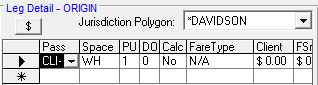
If there are restrictions for the client that require or deny a specific passenger type, the booking cannot be saved until the required passenger type is added to or the denied passenger type is removed from the booking.
If two identical space type or passenger type combinations are added, a warning Unable to save booking: a record already exists with this Passenger Type, Space Type and Fare Type combination message appears.
Procedure
- Select a client and create a trip.At minimum, a Date, Client, Req time, Origin, and Destination should be defined.
- Click the Origin tab.
-
Verify all of the details in the Leg Detail - ORIGIN frame.
The Leg Detail frame shows passenger information defined for the client in the client file. This includes the client's space type and fare type. These can be updated if needed.To update the FareType, the security permission must be granted.
- Click the Destination tab.
-
Verify all of the details in the Leg Detail - DESTINATION
frame.
Leg details for the origin should be mirrored in the details for the destination.