
Viewing Block Times for Pieces of Work
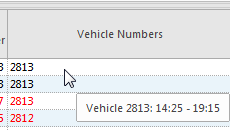
Tooltips show block times for pieces of work in the Daily Activity screen.
- Open the Daily Activity screen and set the Context (F3).
-
Do one of the following:
- In the work view, hover over a number in the Vehicle
Numbers column.
- In the work details view, hover over a number in the Vehicle
Numbers field.
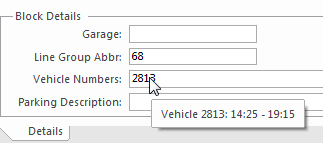
If only one vehicle is assigned to a piece of work, the vehicle block times match the work's From and To times. If the block is split but the run isn't split, the system shows the From and To times of each vehicle assigned to the work. Block times outside of the work From and To times aren't shown. - In the work view, hover over a number in the Vehicle
Numbers column.