
Booking Subtypes
Booking subtypes define the status of a trip.
About this task
The
following list includes some typical booking subtypes:
- DEM
- Casual or demand booking.
- DEN
- Booking denied service because of capacity restrictions.
- ELD
- Booking denied service because the client is no longer eligible for service.
- REF
- Booking for which clients have refused the pick-up or drop-off time offered to them.
- REG
- Subscription bookings.
- SBY
- Bookings on standby.
- URG
- Urgent bookings.
- WCL
- Bookings that require a confirmation call to the client.
Procedure
-
Click .
The Booking Subtypes dialog box appears.
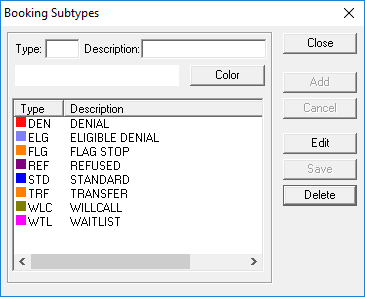
- Type an abbreviation for the subtype (Type).
- Type a Description.
-
Click the Color button.
The Color dialog box appears.
-
Choose a color for the subtype.
For example, if you assign the color green to DEM subtypes, all DEM trips are highlighted green in the Subtype columns of Schedule Editor and Trip Administration.
- Click OK.
-
Click Add.
The subtype is added to the list in the lower section of the dialog box.
- Click Close.