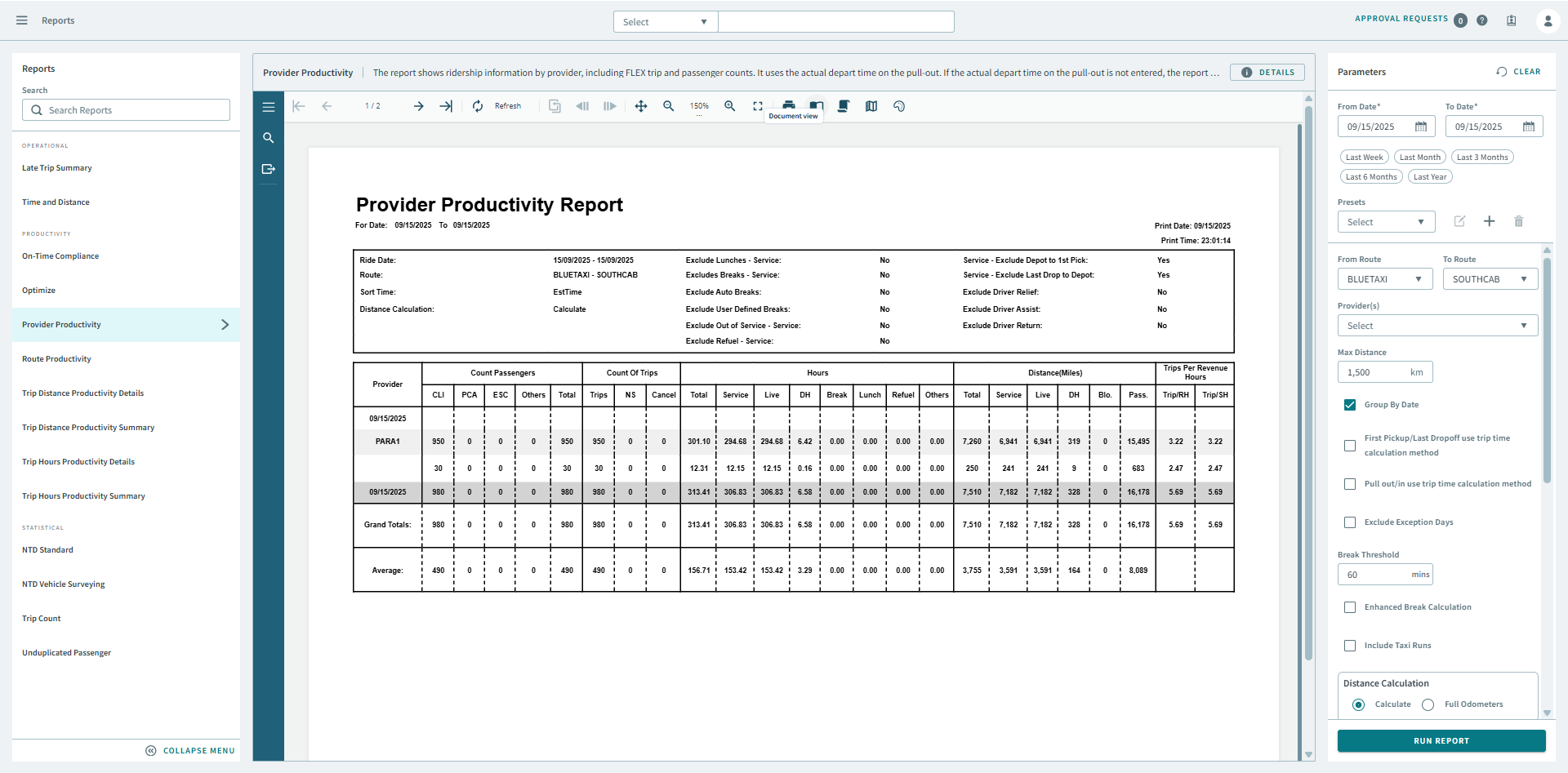
Provider Productivity
The Provider Productivity report shows ridership information by provider.
The report uses the actual depart time on the pull-out. If the actual depart time on the pull-out is not entered, the report uses the ETD instead. If the ETD is not specified, the report uses the esttime. The report uses the actual arrive time on the pull-in. If the actual arrive time is not entered, the report uses the ETA. If the ETA is not entered, the report uses the est time.
| Parameter | Description |
|---|---|
| From Date | First date of records in the report. |
| To Date | Last date of records in the report. |
| Presets | From the drop-down, Select a report parameter configuration. Preset icons allow you to edit a preset, create a new preset, or delete a preset. |
| From Route | Start of range of runs to include in the report. Default is the first run in the pull-down list (sorted alphabetically). |
| Provider(s) | From the drop-down list, choose All or a specific provider for the report. |
| Max Distance | Maximum distance for a single route. If the total distance of a route is greater than this value, it is considered an error and set to 0. |
| Group By Date | If selected, data is grouped by date. |
| First Pickup/Last DropOff use trip time calculation method | First pick-ups normally use the actual arrival time and last drop-offs normally use the actual departure time (overriding the selected sort time method). If selected, the system will use the selected sort time (for example, Est Time) for the first pick-up and last drop-off. |
| Pull out/in use trip time calculation method | If selected, the selected sort time is used as the pull out/in time. |
| Exclude exception days | If selected, the report will ignore days marked as exception days (for example, holidays that run on Sunday service). For more information about exception days, see the PASS System Administrator and User Guide. |
| Break Threshold (Minutes) |
Time in minutes a break must exceed to be removed from the service calculations. For example, if the Break Threshold is set at 60 and an out-of-service break takes 90 minutes, the break will be excluded from service time. A 15 minute out-of-service break would not be excluded. |
| Enhanced Break Calculation | If selected, the break duration is calculated from the last drop before the break to the first pick after the break. If cleared, the break time is computed from the break arrive time to the break depart time. |
| Include Taxi Runs | If selected, taxi runs are included. |
| Distance Calculation | If Calculate is selected, distances are based on PASS calculated distances. If Full Odometers is selected, actual odometer readings are used. The Full Odometers option is not recommended unless you have mobile data to ensure complete odometer readings. If Partial Odometers is selected, the report uses odometer readings when they are available and calculated distances when odometer readings are not available. |
| Trip Time Calculation | Trip Time used in the report:
Note: The Trip Time should be set to the
Est Time or the time that is entered in the Schedule Editor. For
example, do not select Actual Arrive Time if you have not
entered these times. |
| Service | Select any of the following to remove from service hours and
distances:
|