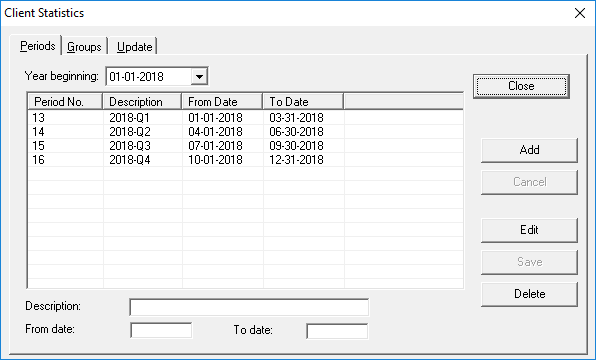
Statistical periods define date ranges the system should use when showing client
statistics.
About this task
When defining client statistical periods, you should complete enough records to cover
the whole year and then choose the next year to define periods for that year. You can add up
to 13 periods.
Procedure
-
Click .
-
Click the Periods tab.
-
Click Add.
-
Provide the following information:
-
In the Year beginning field, click the year for which to
create periods.
-
Type a Description of the first period in the year.
-
Type the From date for the period.
By default this field will populate with the next date after the previous period's
To date.
-
Type the To date for the period.
-
Click Save.
The record is saved.
-
Create any additional statistical periods.
-
Click Close.