
Entering Work Preferences
Define employee work preferences in the Employee Profile screen.
- Open the Employee Profile screen and set the Context (F3).
- Select an employee.
- Select Work Preference.
-
Do one of the following:
- To enter work preferences for an existing date range, select the date range in the list in the upper pane. The employee's work preferences for the date range appear in the lower pane.
- To enter work preferences for a new date range, enter a From
Date and To Date in the top pane and
select Save.Note: The new date range can't overlap an existing range.
-
With the date record to updated selected in the upper pane, select the
Preference Order field for the row marked with the
asterisk in the lower pane and enter a number indicating the employee's
preference for this work type.
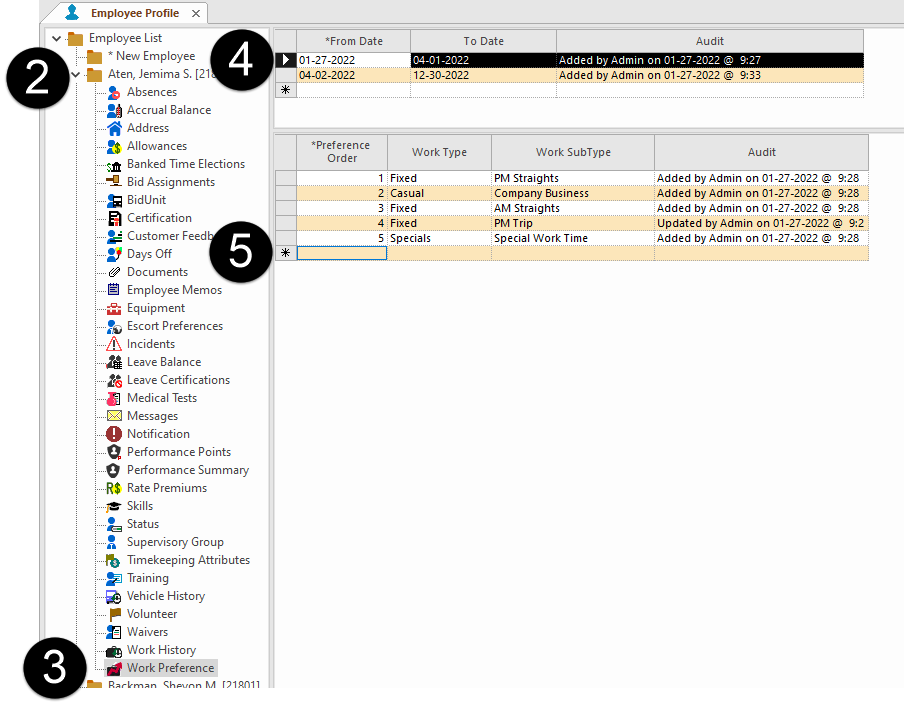
The lower the number, the more preferred the work. One (1) is preferred over three (3). - Select the Work Type for the preference.
- Select the Work SubType for the preference.
- Select Save.