
Associating Clients with Administrative Units
After the Master Client record and the administrative unit are created, you must associate the Master Client and other client records with the administrative unit.
About this task
Procedure
- Do one of the following:
- Click .
- Click the Clients button:

Client Registration appears. - Select a client record.
- Click the Detail tab.
-
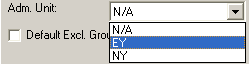
In the Adm. Unit list, click the administrative unit you want to
associate with this client.
- Click the Save button:

- Repeat this procedure for the Master Client and any other clients to whom you want to assign similar eligibility conditions and rules.