
About Work Assignment Assistant
The Work Assignment Assistant matches available extraboard and volunteer employees, in order of their position in the Daily Employee List, with pieces of open work.
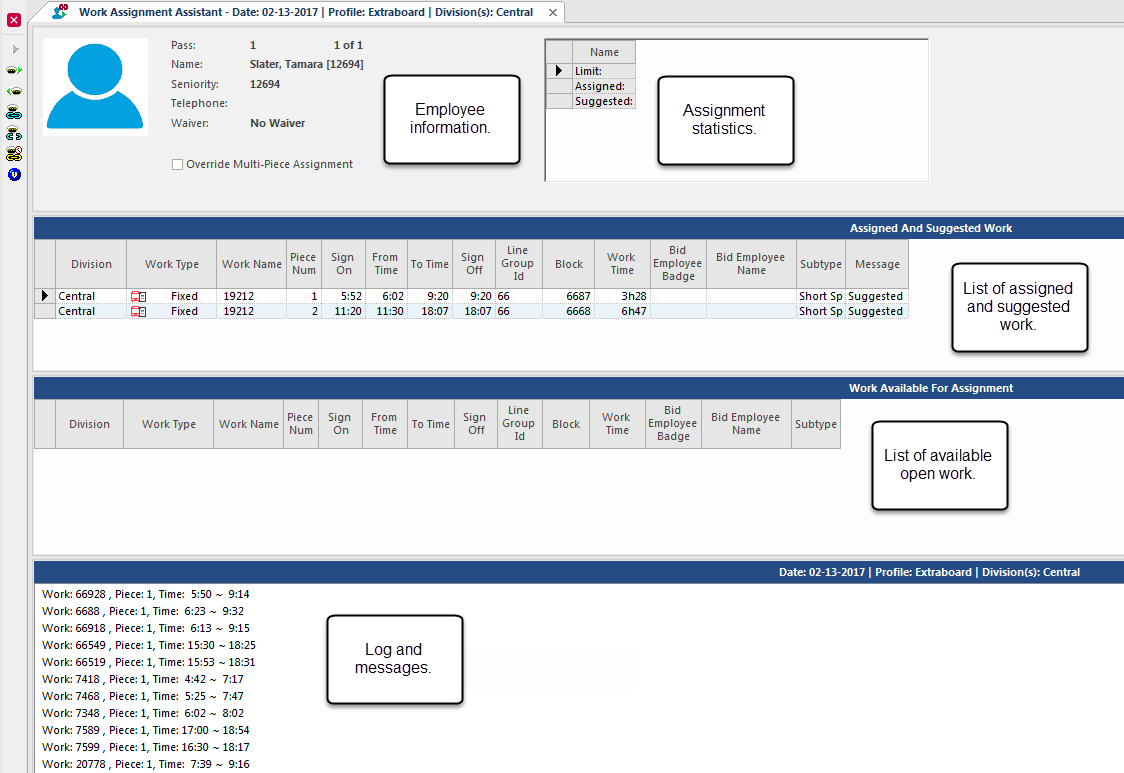
Using Work Assignment Assistant, you can do the following:
- Accept or decline the system's assignment suggestions.
- Assign work automatically without approving each assignment.
Before assigning work with Work Assignment Assistant, you must create a profile from the Work Assignment Assistant Profile screen. A profile specifies rules for assigning work and priorities for various types of work.
The properties determine how Work Assignment Assistant works and which features are available.
Work Assignment Assistant can consider employee work preferences when matching employees with work.
The wizard tries to match each employee with available work that meets the following criteria:
- Is highest in the employee's preference list
- Doesn't violate spread time rules
- Has the earliest start time
If two preferred runs have the same start time, the employee matches to the run with the earlier end time.
Depending on the and settings, Work Assignment Assistant must either assign all pieces of a piece of work together or can assign pieces separately.
When you assign work using Work Assignment Assistant, the system records suggested and assigned work for each employee. The system also records when assignments aren't made because employee skills have expired. You can see this information in the OPS Process Log.
| Button | Label | Description |
|---|---|---|
 |
Start Work Assignment | Starts the manual work assignment process. |
 |
Next | Assigns suggested work (shown in the Assignment pane) and goes to the next employee. |
 |
Previous | Assigns suggested work (shown in the Assignment pane) and goes to the previous employee. |
 |
Assign Work | Assigns open work. |
 |
Unassign Work | Unassigns work. |
 |
Auto assign all work | Starts automatic work assignment. |
 |
View Work Rule Progression | Shows work assignment violations. |