
Returning Operators to Standby Work
Operators on standby who are assigned work can be reassigned (returned) to standby when the work ends.
- Open the Daily Activity screen and set the Context (F3).
- Assign an operator to work.
-
If the Stand-by Sign Off dialog appears and includes
a Put back on Standby, select the option.
You will only see this screen if the assigned work starts after the standby sign on and ends before the standby sign off.
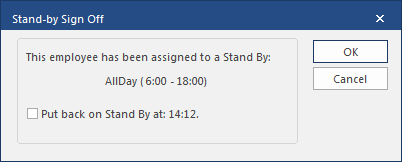 After selecting the option, additional options appear.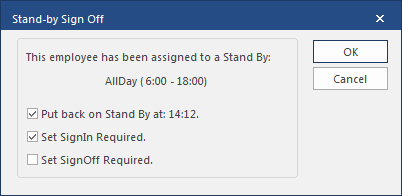
- Optional: To require the employee to sign in to the second part of the standby, select Set SignIn Required.
- Optional: To require the employee to sign off from the second part of the standby work, select Set SignOff Required
- Select OK.