About Ancillary Data Details

The Show Ancillary Details feature can help you understand how and where your ancillary data is used.

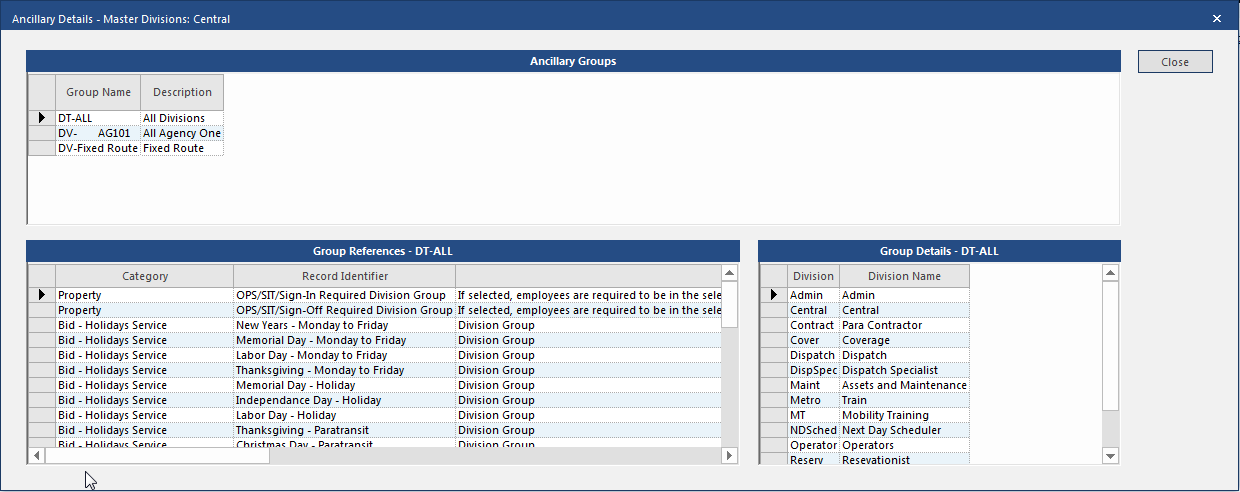
It can be difficult to understand the impact of changing or deleting ancillary records because data entered on one ancillary screen may be referenced on several other screens. If the ancillary data screen you are viewing supports this feature, you can see details by clicking on a row and right-clicking Show Ancillary Details. The Ancillary Details dialog for that row appears.
Show Ancillary Details for OPS Master Divisions

The top pane lists the ancillary groups where the selected item is referenced. Selecting a group shows references to and details of that group in the lower pane.

Currently, ancillary data details are found in the following ancillary data screens:

  • Absence Reasons

  • Absence Relationships

  • Absence Types

  • Accrual Types

  • Admin Action Types

  • Agencies

  • Bid Units

  • Day Types

  • Disqualification Rules

  • Employee Status Types

  • Employee Types

  • Equipment Types

  • Extra Pay Reasons

  • Extra Pay Types

  • Misconduct Types

  • OPS Bus Types

  • OPS Daily Activity Types

  • OPS Dispatch Reasons

  • OPS Employee Day Type

  • OPS Garages

  • OPS Incident Types

  • OPS Job Classes

  • OPS Master Divisions

  • OPS Run Types

  • OPS Timekeeping Attribute Types

  • OPS Vehicle Types

  • Pay Codes

  • Skill Types

  • Volunteer Types

  • Work Subtypes