Updating the Use Accrual Flag
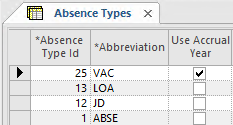
For absence types associated with an accrual type that uses an expiration method of Accrual Calendar, the Use Accrual Year flag must be set.
- Open the Absence Types screen.
- Select an absence type record.
-
Select Update Use Accrual Flag:
 All records are refreshed, and any records that should use the accrual year (that is, they use the Accrual Calendar expiration method) show a selected checkbox in the Use Accrual Year column.